Retrieving and Using Slack Cookies for Authentication


Slack, like many other services, uses cookies to store authentication and session information. What is interesting with Slack, however, is that one particular cookie can be used to generate a user session token, and provide you programatic access to Slack as the user who generated it.
This is the imaginatively named d cookie, and is available from a browser with an authenticated Slack session, or a device with the Slack app installed.
Slack User Sessions
Slack’s authentication is built around sessions, not just a single token. When you log into Slack (via browser or app) the Slack client establishes a session made up of three components:
- A long-lived session cookie (the
dcookie) (plus some additional session-binding cookies, but we’re not that interested in those). - A user session token (an
xoxc-token) - Other metadata describing the authenticating user, workspace(s) and permissions
The cookie and the token are tied together; the cookie is passed to Slack to authenticate a user, and Slack returns a session state object which contains the user session token.
From Slack’s point of view, this token is the user, it has the exact permissions of the logged in account, including:
- Workspace membership
- Channel membership and visibility
- File access
- App installation rights
- Administrative privileges
We can exploit this d cookie to get a user session token, bypass the normal OAuth flow, and gain programmatic access to Slack with the same privileges the user would have through the UI.
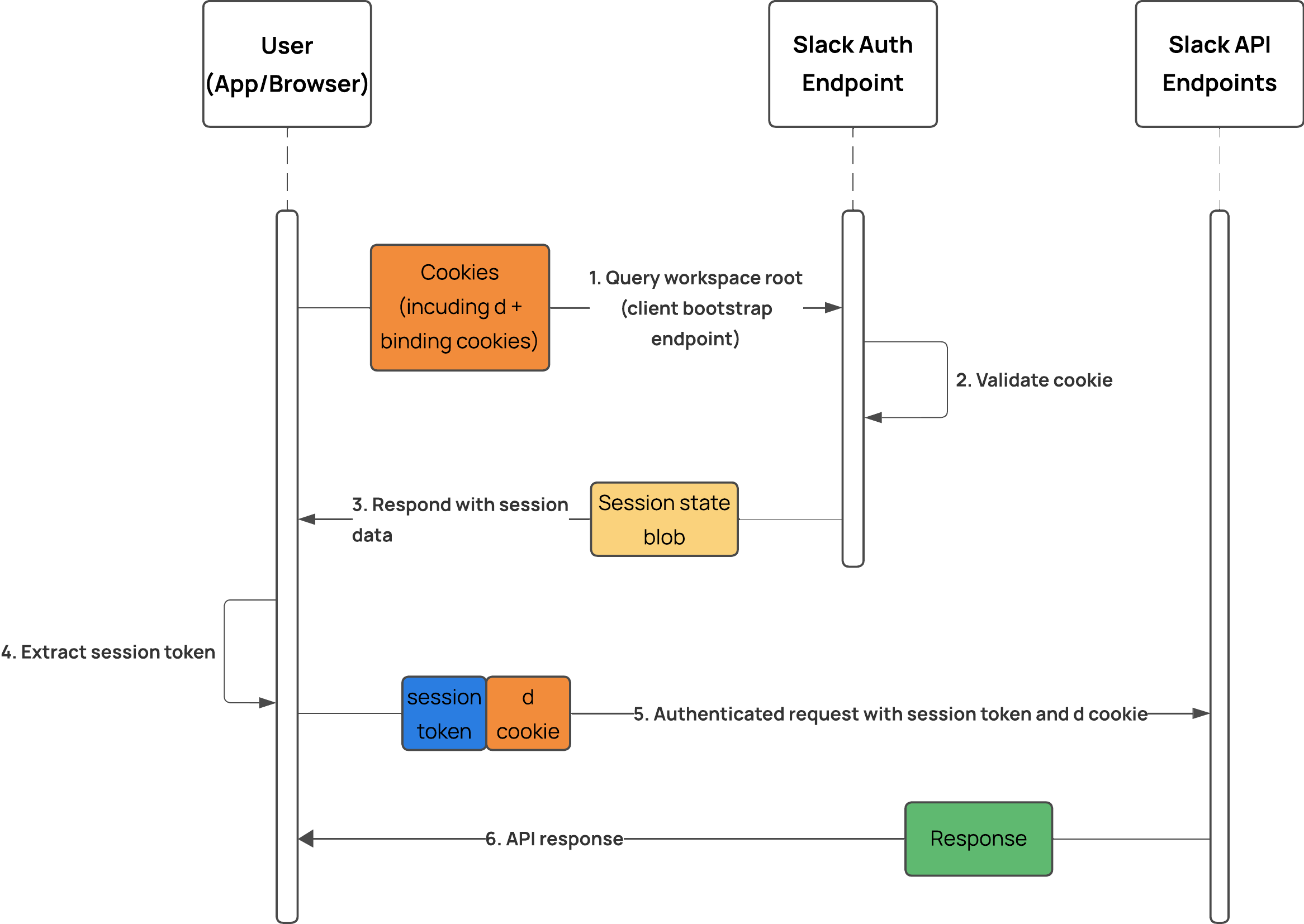
Getting the d cookie
From a browser
If you have access to an authenticated browser session (i.e. you’re retrieving your own Slack cookie), the easiest method of getting the d cookie is to extract it directly from the browser.
In a browser window authenticated to Slack, and with Slack open, go to developer tools and head to the storage section (in Chrome this is under Application -> Storage)
Under cookies expand app[.]slack[.]com and you will see all the cookies that Slack stores in the browser for the session.
The one you want to copy is the d cookie, this starts with xoxd-...

Update Dec 2025: Slack have shortened the time-to-live on the cookie. Previously it was 10 years, but it is still fairly long lived, with an expiration date of over a years time.
From the Desktop Application
This is a more in-depth process depending on what OS you’re using. I will cover it in a future blog post.
Using the Cookie to Get a User Session Token
We can use this cookie in a HTTP request to a Slack workspace the user has access to to retrieve a user session token, which will begin xoxc-.... You can then use this token in place of a user or bot token for the Slack API.
Make an HTTP GET request via cURL to a workspace you know the user has access to. I know that the user cookie I’ve got has access to the slack workspace westeros-inc, so I send a request like this:
curl -L --cookie "d=xoxd-REDACTED" https://westeros-inc.slack.com
In the response, Slack includes a session state JSON object, which includes the user session token under the api_token key:

We can pipe this output to grep using a regex pattern to get the user session token value:
curl -L --silent --cookie "d=xoxd-REDACTED" https://westeros-inc.slack.com | grep -ioE "(xox[a-zA-Z]-[a-zA-Z0-9-]+)"

d cookie to retrieve the session token valueEnterprise Users
If you (or your target) are an Enterprise Grid user, you may find there are two xoxc tokens in the response:
api_tokenenterprise_api_token

api_token and the enterprise_api_tokenYou can use either of these tokens, the only difference is the context of the session.
- The standard
api_tokenis for the user’s session on the workspace that you queried. - The
enterprise_api_tokenis associated with the user’s organisation-level session and operates at the Enterprise level.- This means that certain API requests, such as search endpoints, will work over all workspaces the user is a member of.
Authenticating with the Session Token
This token can be used in place of a user (xoxp-) or bot (xoxb-) token as a bearer token for API authentication to Slack. To authenticate via the API, you must also include the cookie in a request:
curl --request GET \
  --url https://slack.com/api/auth.test \
  --header "authorization: Bearer xoxc-{{REDACTED}}" \
  --cookie "d=xoxd-{{REDACTED}}"
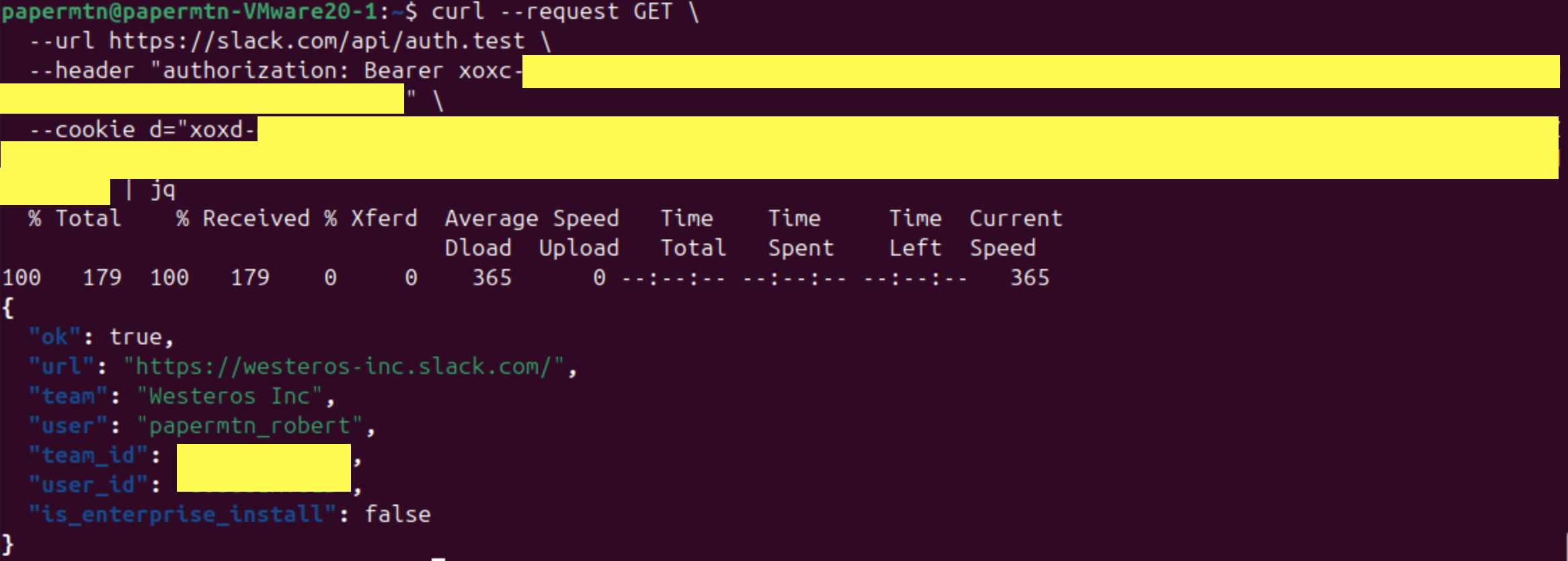
d cookie to query the auth.test endpointUse Cases
There are several reasons why you might want to use a cookie to gain programmatic access to Slack.
Legitimate Use Cases
(You’re probably not a bad person, you just want to do things quickly)
- You want API access to Slack but your admin has locked down custom app installs, and you just need to automate something simple
- You need to bulk-export messages or files but the official export is slow or unavailable
Less Legitimate Uses Cases
(You may be a bad person… but I’m not here to judge):
- Persisting access to a Slack workspace from a compromised device
- Turning a stolen browser profile into full Slack access
- Bypassing OAuth flows and MFA requirements
- Impersonating a Slack user to send messages or join channels undetected
Below is an example of how powerful user impersonation can be for phishing. The post I’ve made via API, using a Slack block kit formatted message, looks legitimate because it is sent from the impersonated user’s real account. That level of trust can be abused to lure colleagues to fake sign-in pages or other credential harvesting traps.
curl --request POST \
  --url https://slack.com/api/chat.postMessage \
  --header "authorization: Bearer {{REDACTED}}" \
  --header "content-type: application/x-www-form-urlencoded" \
  --cookie "d=xoxd-{{REDACTED}}" \
  --data channel={{CHANNEL_ID}} \
  --data 'blocks=[
        {
            "type": "section",
            "text": {
                "type": "mrkdwn",
                "text": "Hello, please can everyone fill in their details on the new HR system <https://malicious-example.com|here> "
            }
        }
    ]'
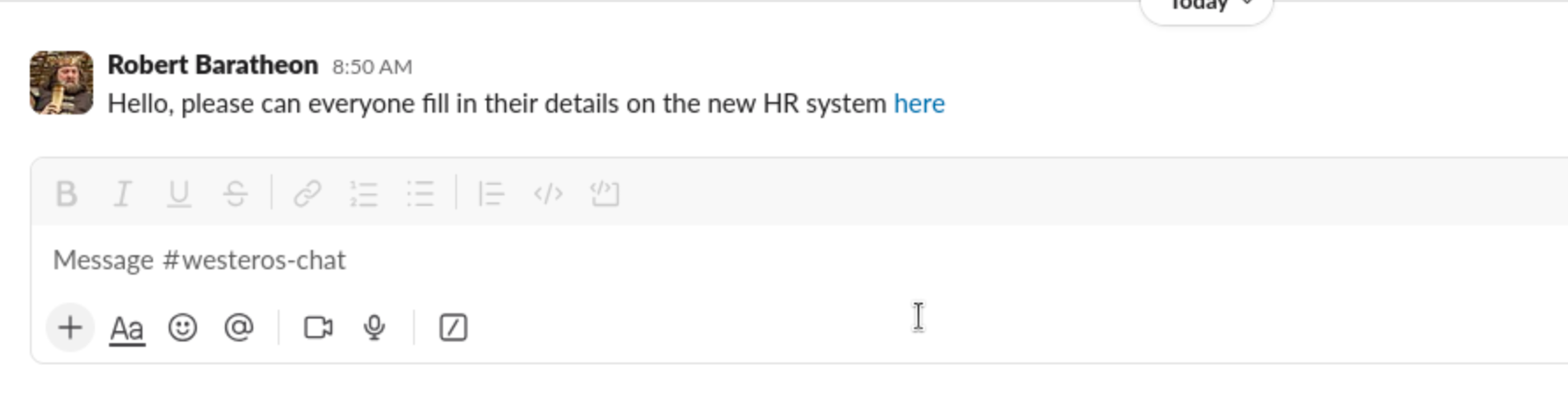
Slack Watchman
Another way to use a Slack cookie is with Slack Watchman, an application I have built for blue-teams, red-teams, and anyone in-between. Slack Watchman can enumerate Slack workspaces and find exposed secrets, and it provides you the option to authenticate using only the d cookie.
Slack Watchman performs a series of read-only reconnaissance actions:
- Listing all workspaces associated with the account
- Enumerating public and private channels the user can see
- Scraping messages and files (within the user’s permissions)
- Identifying exposed credentials, secrets, tokens, and API keys
- Flagging potentially sensitive or high-risk content
This makes Slack Watchman useful in combination with your Slack cookie for:
- Security auditing: seeing how much sensitive information is in a Slack Workspace.
- Secret hunting: discovering leaked API keys, access tokens, credentials, or passwords.
- Red-team operations: mapping Slack environments without needing to authorise an app.